
How to Register on OKX
From registration to identity verification usually takes about 10 minutes. The most important thing is to make sure the referral code field in step 2 contains sigbtc. Even if the field says 'optional', you won't receive payback if it's left blank.
- Referral Code
sigbtc- Payback
- USDT-M Futures Fee 50%
- Processing Time
- About 10 minutes
Prepare before you start
- An email address to use for sign-up (one not previously used with OKX)
- Mobile phone in your name (for SMS verification, select +82 for Korean numbers)
- Original ID in your name (driver's license recommended, resident registration card or passport also accepted)
- A mobile phone or PC with a camera (for facial verification)
-
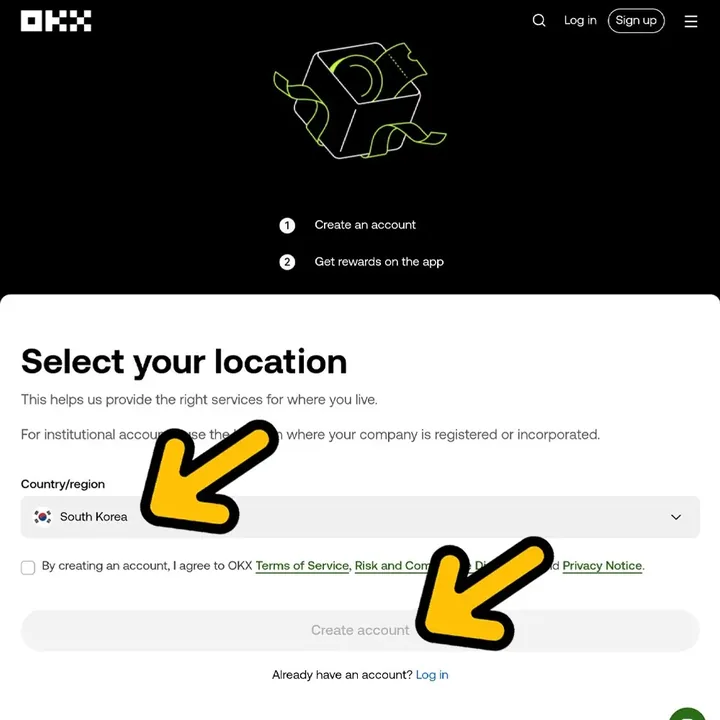 STEP 01
Select your country of residence and create an account
Click the sign-up button below to open OKX and select your country of residence. If you live in South Korea, choose South Korea, check the terms and conditions, and click Create account.
- Your country will be verified again during KYC, so please select your actual country of residence.
-
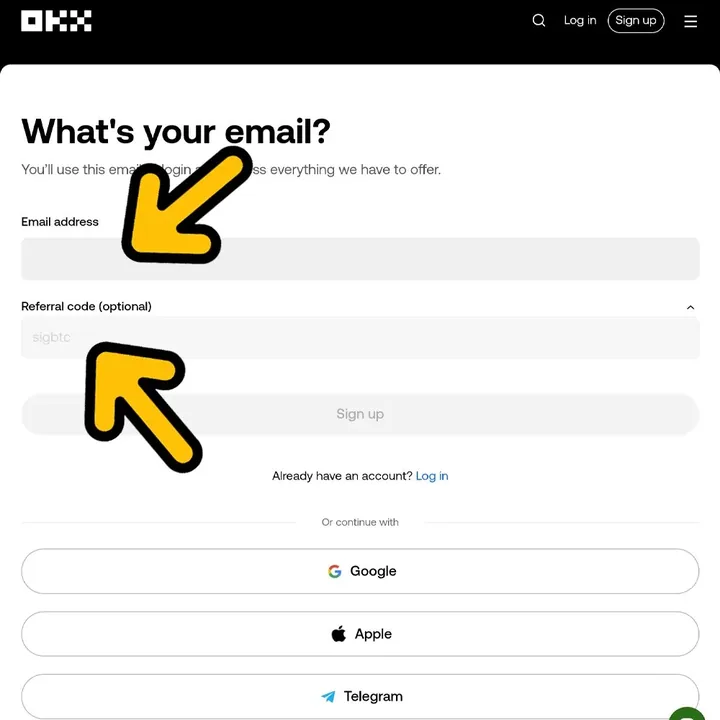 STEP 02
Enter your email · Check referral code sigbtc
Enter the email you want to use for sign-up, then check that sigbtc is entered in the Referral code (optional) field below. Click Sign up to proceed.
- Even if it says 'optional', it’s required to receive payback.
- If the field is empty, please enter sigbtc manually. You cannot edit this field after registration is complete.
-
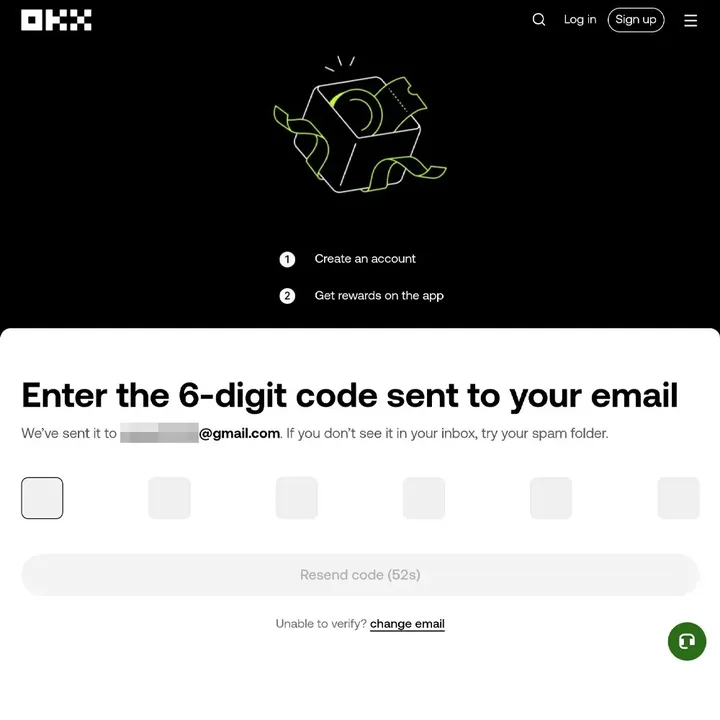 STEP 03
Enter the 6-digit verification code sent to your email
A 6-digit verification code will be sent to your email. The code is only valid for a short time, so enter it right away.
- If you don't see the email, please check your spam folder.
- If time has passed, click Resend code to get a new code.
-
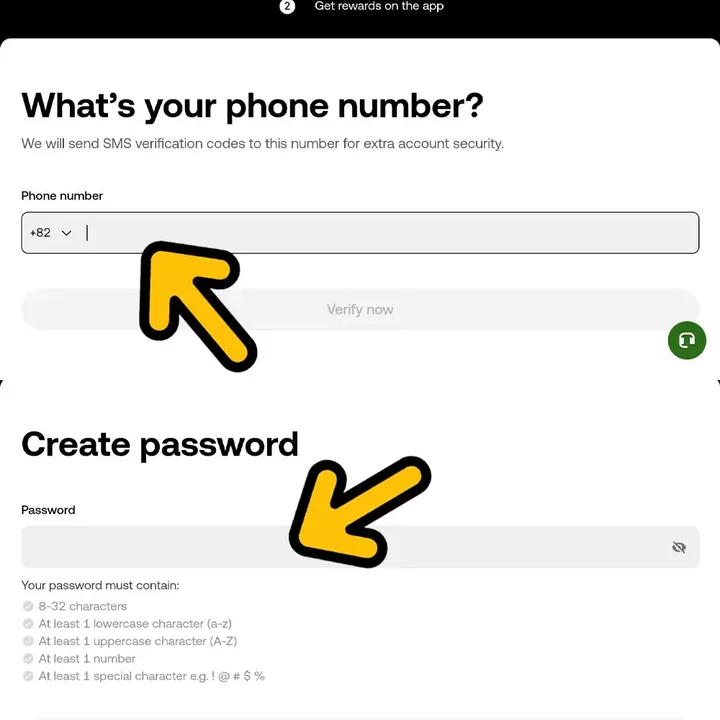 STEP 04
Phone verification and password setup
Select country code +82, enter your mobile number, complete SMS verification, and set your password.
- After selecting +82, enter your phone number without the leading 0. (010… → 10…)
- Password must be 8–32 characters and include at least one uppercase letter, one lowercase letter, one number, and one special character.
-
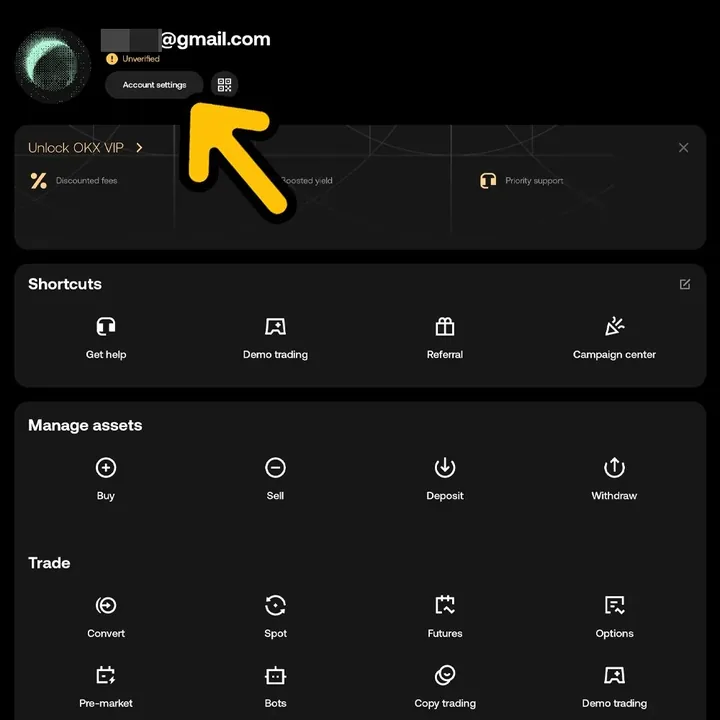 STEP 05
Open account settings from your profile
Once sign-up is complete, you'll see your profile screen. Click Account settings below your email at the top left.
- At this stage, your account status will show as Unverified.
-
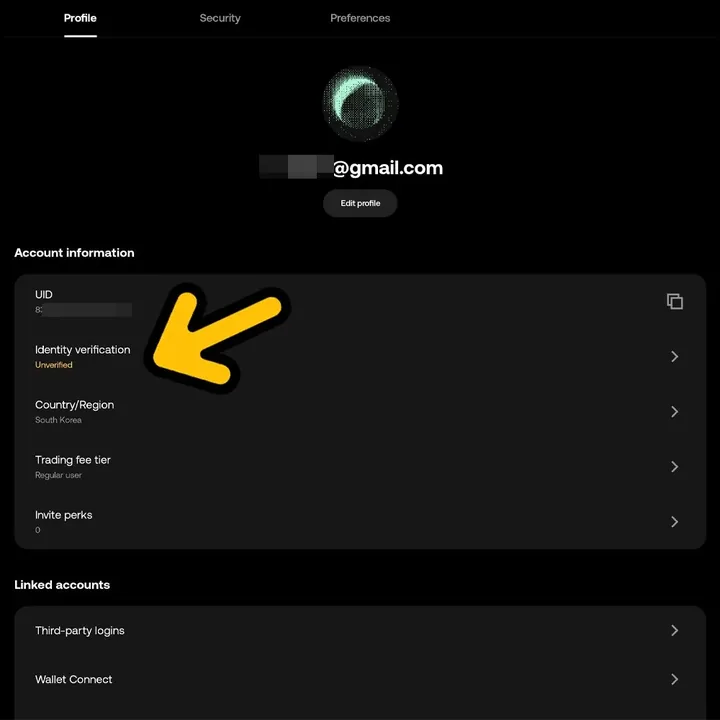 STEP 06
Tap Identity verification
In the Account information section of the Profile tab, click Identity verification to access the verification screen.
- It still shows as Unverified here.
-
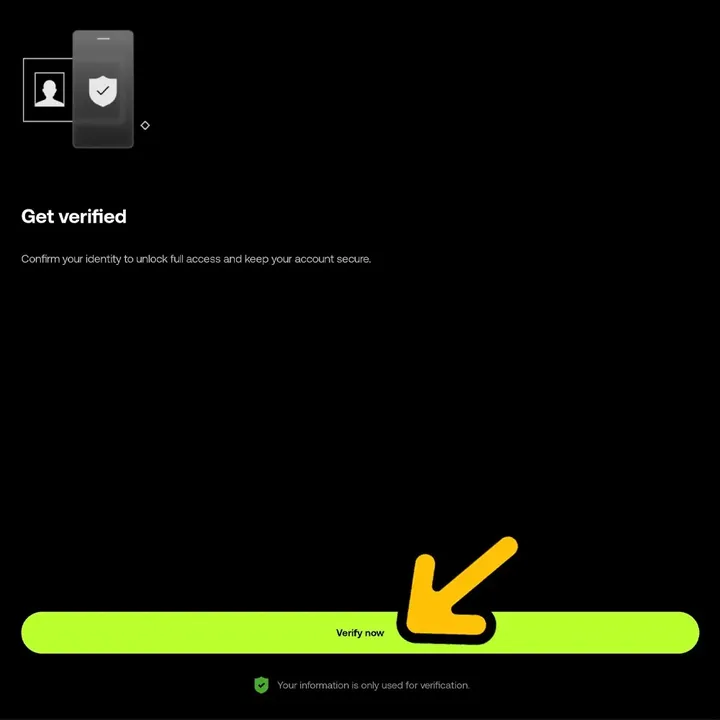 STEP 07
Start verification with Verify now
Read the instructions on the Get verified screen and tap the green Verify now button below.
- Deposits, withdrawals, trading, and payback accumulation all require completed identity verification.
- The information you enter is used only for identity verification and is stored securely with encryption.
-
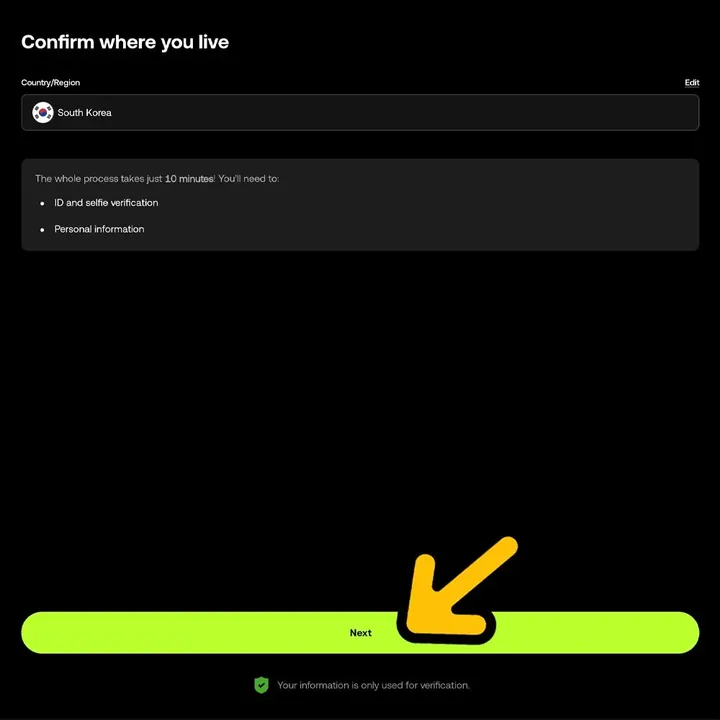 STEP 08
Confirm your country of residence and click Next
On the Confirm where you live screen, make sure your country is set to South Korea and tap Next.
- Full verification takes about 10 minutes.
- Prepare your ID and a camera for selfies in advance.
-
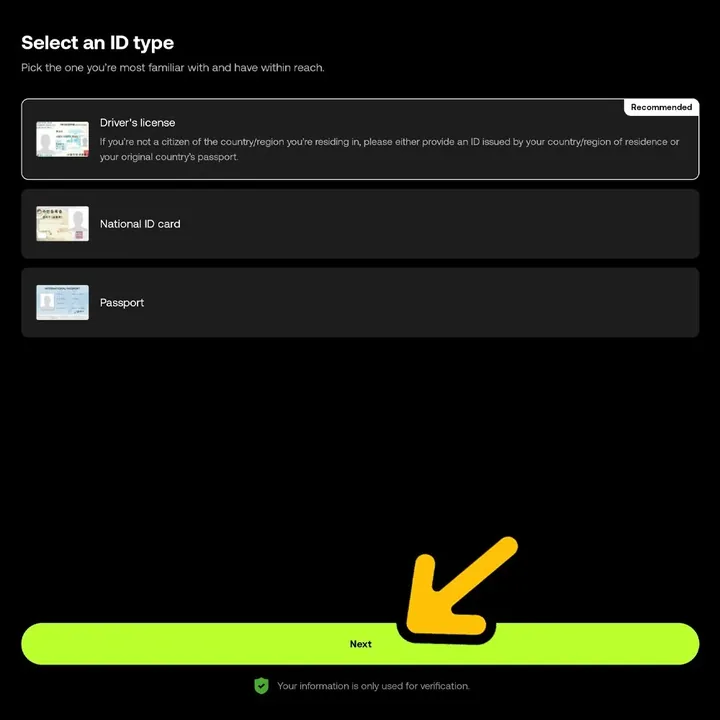 STEP 09
Select ID type and complete verification
Choose your ID type and follow the instructions to take a photo of your ID and complete facial verification to finish registration.
- The driver's license has a Recommended label.
- Take the photo in a well-lit area so the text on your ID is clear.
If you've finished, do the following
- Register UID on sigbtc My PageCopy your UID from the OKX app profile and enter it in sigbtc My Page → Add new exchange → OKX. Payback starts accumulating only after UID registration.
- USDT-M Futures Trading50% of USDT-margined perpetual and futures trading fees are eligible for payback. Spot trading is not included.
- Daily Auto Accrual & WithdrawalPayback is automatically calculated daily based on the previous day’s fees and credited to your sigbtc My Page. Accumulated amounts can be withdrawn as USDT from the withdrawal page.
Frequently Asked Questions
Can I still get payback if I already have an OKX account?
If you meet the requirements, you can receive payback. OKX allows you to change your referral code on the official application page without deleting your account. Your account must be over 90 days old and have less than 75,000 USDT trading volume in the last 90 days. For details, see the 'How to Change OKX Referral Code' guide.
How can I check if the referral code sigbtc has been applied?
If you sign up using the button on this page, the Referral code field will be automatically filled with sigbtc. Before completing registration, make sure you see sigbtc in the field.
Is phone verification required?
Yes. For security, OKX requires SMS verification during sign-up. For Korean numbers, select country code +82 and enter your number without the leading 0.
Is identity verification (KYC) required?
Yes. KYC is required to deposit, withdraw, or trade. It takes about 10 minutes, and trading and payback accumulation start only after verification is complete.
Which ID type is the fastest to verify?
On the OKX screen, a recommended mark appears on your driver’s license. If you don’t have a driver’s license, you can use your national ID or passport.
When and how do I receive the payback?
Register your OKX UID on your sigbtc My Page and your daily payback will be automatically calculated based on the previous day's trading fees. You can check your accumulated amount on My Page and claim your USDT payout on the withdrawal page.
Where can I get help if I get stuck during sign-up?
Contact us via sigbtc Telegram 1:1 support. For faster assistance, send your registered email and a screenshot of the step where you're stuck.
Other guides: Referral Code Change
Last updated · If you encounter any issues, please contact sigbtc Telegram Support with a screenshot of your current screen.